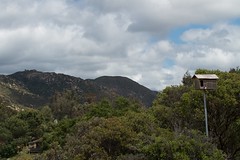
Barn Owl Family

Barn Owl Box I think of the book “Owls in the Family” often these days, which is pretty amazing considering my only exposure to it is a teacher reading it to the class when I was in elementary school. The reason is the family of barn owls residing in the owl box in our back yard. The box is visible in this photo.

There are two adult owls living in the box, and what sounds like at least a couple owlets. We have been hearing the owlets begging for a some weeks now, and can even occasionally see one in the box through binoculars. We haven’t been able to tell how many hatched, but it sure sounds like more than one. It’s quite a racket. (For a sample, look for the “chicks begging” link on the Barn Owl page from OwlPages.com.)

At some point during this last night the owlets were pushed out of box. It’s hard to say why, because they are definitely not old enough to venture out on their own yet. I was quite heartbroken when I found one on the ground this morning, dying before my eyes. I couldn’t see any activity in the box. Hoping any siblings were still up there resting comfortably, I figured I would find out when night fell.


Continue reading Barn Owl Family

Cover Photo – The Attached Family Magazine

The Attached Family Magazine - Spring, 2010Following up on the Attached at the Heart Through the Years photo contest, my winning photo is featured as the cover photo for the Spring 2010 edition of The Attached Family Magazine.

I didn’t mention this before, but this photo was not posed in any way. Our daughter assumed this position on her own as my wife moved to cradle her little body. Luckily the camera was close at hand, as seconds later she either woke up or rolled over — I can’t remember any more. I’m sure my wife can still describe every detail of those fleeting but precious moments, though.

New site theme

Updating the site theme has been on my “to do” list for quite some time. When creating any new site, I usually start with the Thematic WordPress Theme Framework and start modifying to suit the needs of the site. I have always had a dark theme for my site, and not many customizations beyond that have been made so far. More changes on the way as time permits.

Hey, check out my photography Project 365 gallery. This page would not display properly in the old theme. Having more flexibility to add photos from other sites was the main impetus to finally updating the theme.

Attached at the Heart Through the Years

Attached at the Heart Through the Years winnerThis is somewhat stale news, but since updates here are few and far between these days: My wife entered one of my photos in Attachment Parenting International’s “Attached at the Heart Through the Years” photo contest in October, 2009. This image was one of the favorites — photo 2.

I’m going to be featuring photography more prominently on this site in 2010.

You do not have sufficient permissions to access this page: WordPress Contact Form ][ plugin

There is a problem that seems to still be plaguing many WordPress plugins since upgrading to WordPress 2.8.2 over the summer: Navigating to the plugin admin page results in the WordPress error, “You do not have sufficient permissions to access this page.” The only affected plugin on sites I maintain is the Contact Form ][ plugin. Zalds.com has a good write up on how to fix the problem for the Adsense Deluxe plugin, and the solution is the same for the Contact Form ][ plugin.

Here are the steps to fix the problem. It seems like a lot, but only because I am breaking it down into very fine steps.

  1. Log in to the admin area of the site.
  2. Go the the list of installed plugins by clicking the “Installed” link in the Plugins menu.
  3. Deactivate the Contact Form ][ plugin. It is not recommended to make changes to an active plugin.
  4. Edit the Contact Form ][ plugin by clicking the “Edit” link next to the Activate/Deactivate link. This will allow access to the actual PHP code of the plugin.
  5. Find the text “admin_head” using the browser find functionality, just like you would search for text in a web page (usually “Control-F” on Windows, “Command-F” on Mac).
  6. Change “admin_head” to “admin_menu”.
  7. Hit the “Update File” button.
  8. Go back to the list of installed plugins and reactivate the Contact Form ][ plugin.

To better illustrate the line that needs changed, this line:

    add_action('admin_head', 'wpcf_add_options_page');

needs to be changed to look like this:

    add_action('admin_menu', 'wpcf_add_options_page');

The zalds.com solution has some screen captures to illustrate the process as well, although that fix is for the Adsense Deluxe plugin. Again, the process is identical, so substitute “Contact Form ][” for “Adsense Deluxe” in that solution, and you should regain access to the admin pages for the Contact Form ][ plugin.

Tech stuff: The admin_head hook should not be used to add plugin specific content to admin pages, as it adds the plugin specific content to every admin page, which has the potential to break other plugins. More on this topic here.

Incidentally, the author of the Contact Form ][ plugin seems to have stopped maintaining it and has taken his site down, apparently due to lack of donations.